Evals & Prompt Engineering
- ▸Engineer prompts at three levels: vague, specific, and few-shot
- ▸Build a mini eval harness with labeled test cases
- ▸Use LLM-as-Judge for open-ended evaluation
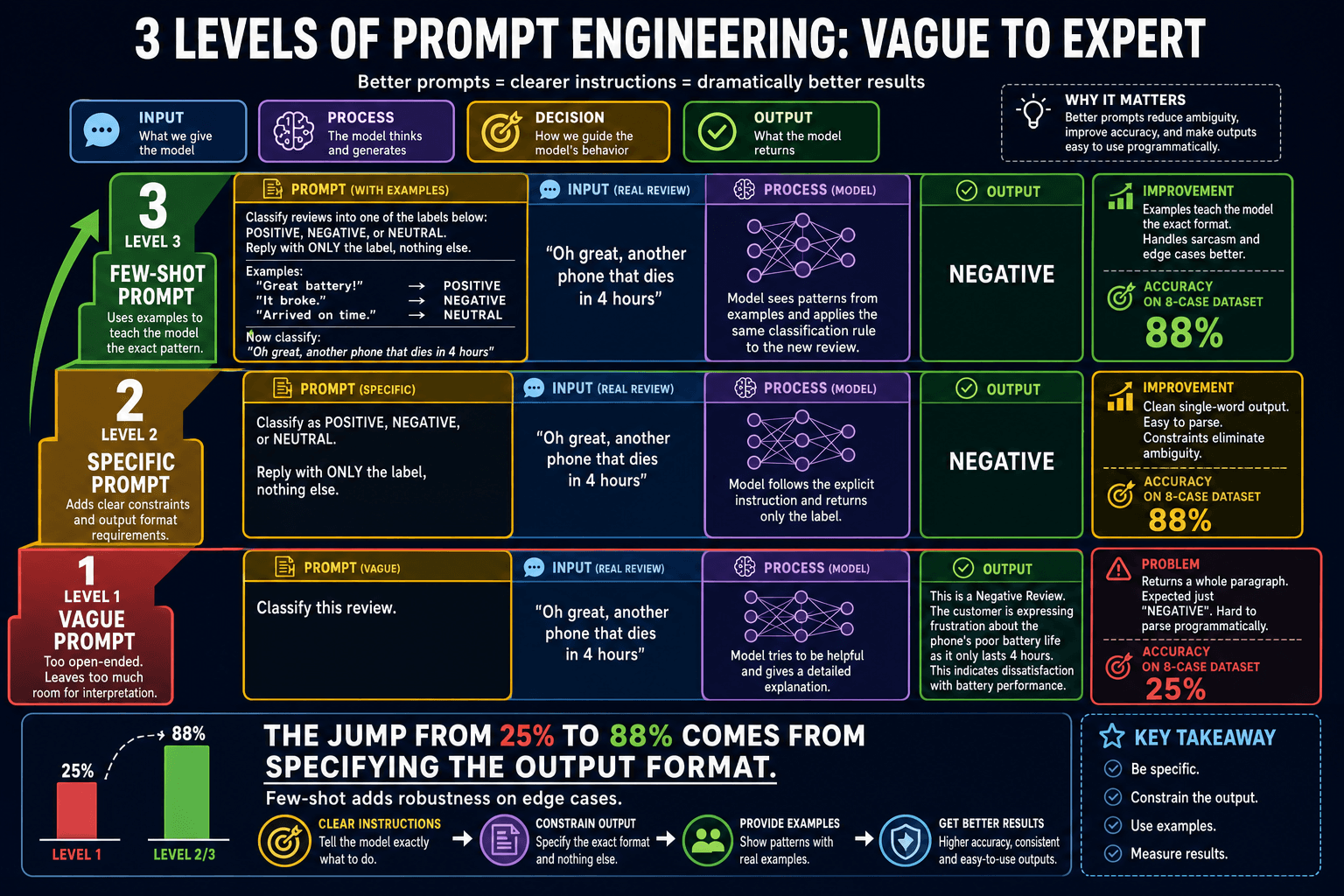
Level 1: Vague prompt
A vague prompt gives the model too much freedom. For classification tasks, the model might return "This review is positive", "Positive!", "I think this is a positive review", or "POSITIVE" — four different formats that are all correct but all require different parsing. Accuracy on structured tasks is typically around 25% with vague prompts.
# Level 1: Vague — unpredictable output format
vague_prompt = 'Classify this review: "{review}"'

response = model.invoke(vague_prompt.format(review='The product broke after one day.'))
print(response.content)
# Might return: "This review is negative and expresses disappointment."
# Or: "NEGATIVE"
# Or: "Negative sentiment detected."
Level 2: Specific prompt
Adding explicit constraints — the allowed output values and a strict format instruction — dramatically improves accuracy and consistency. The model stops guessing about format and focuses on the classification itself. Accuracy typically jumps to around 88%.
# Level 2: Specific — constrained output format
specific_prompt = (
    'Classify the sentiment of the following review.\n'
    'Respond with exactly one word: POSITIVE, NEGATIVE, or NEUTRAL.\n'
    'Do not include any other text, punctuation, or explanation.\n\n'
    'Review: "{review}"'
)

response = model.invoke(specific_prompt.format(review='The product broke after one day.'))
print(response.content)  # "NEGATIVE" — reliably, every time
Level 3: Few-shot prompt
A few-shot prompt includes two or three input-output examples before the real task. The model pattern-matches to your examples and mirrors their format perfectly. This is especially valuable for ambiguous edge cases — your examples implicitly define how to handle them.
# Level 3: Few-shot — model matches your example format exactly
few_shot_prompt = (
    'Classify sentiment. Reply with only POSITIVE, NEGATIVE, or NEUTRAL.\n\n'
    'Review: "Arrived on time and worked perfectly."'
    '\nLabel: POSITIVE\n\n'
    'Review: "Completely useless, stopped working in an hour."'
    '\nLabel: NEGATIVE\n\n'
    'Review: "It's fine, does what it says on the tin."'
    '\nLabel: NEUTRAL\n\n'
    'Review: "{review}"\nLabel:'
)

response = model.invoke(few_shot_prompt.format(review='The product broke after one day.'))
print(response.content) # "NEGATIVE" — clean, matches example format perfectly- •"Classify this review"
- •Model guesses the output format
- •Hard to parse programmatically
- •Inconsistent across runs
- •Explicit allowed values listed
- •"Reply with only one word"
- •Consistent, parseable output
- •Much easier to evaluate automatically
- •2-3 input/output examples included
- •Model mimics example format exactly
- •Handles edge cases via example
- •Best for ambiguous or nuanced labels
Building an eval harness
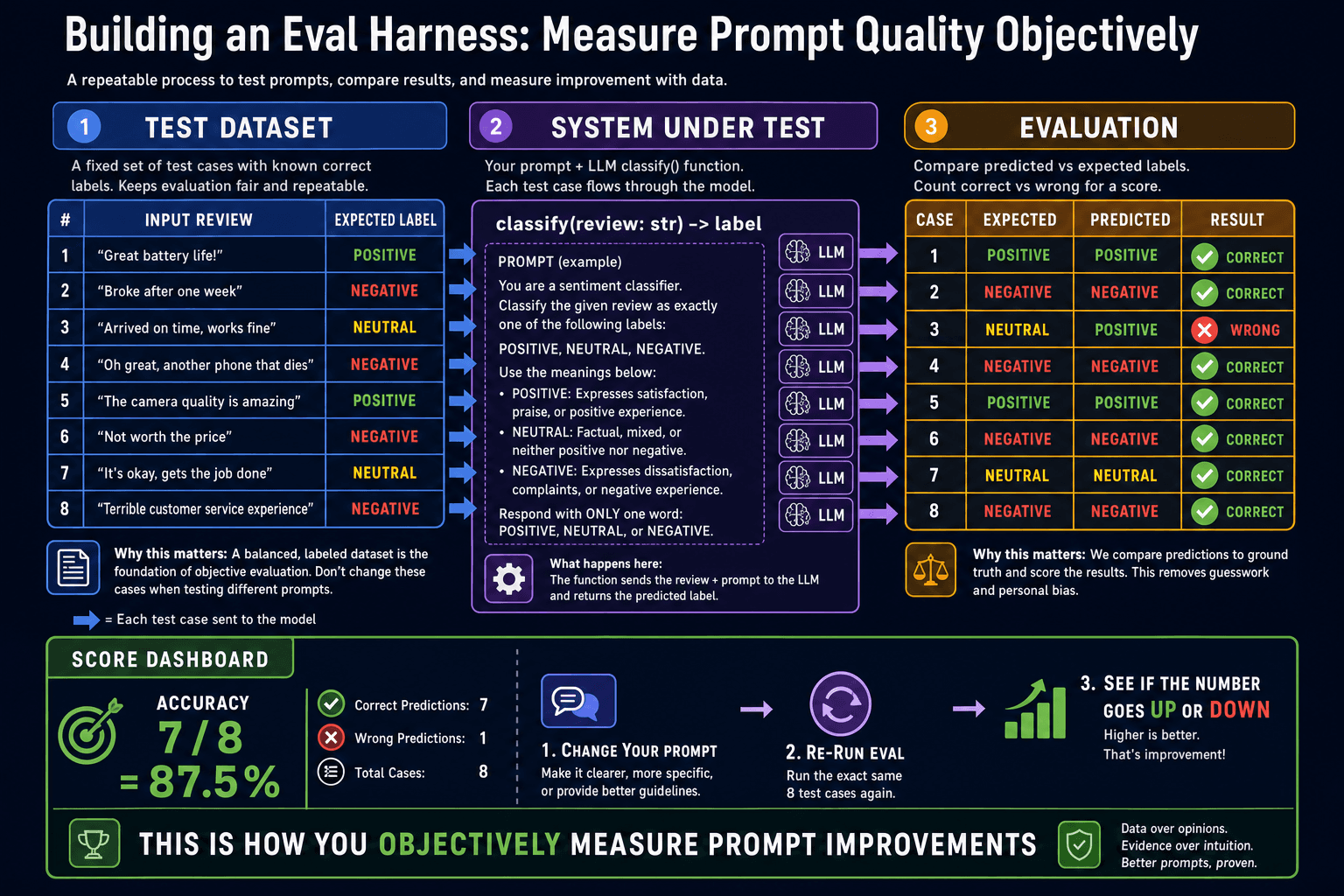
DATASET = [                                                  # ①
    {'review': 'Works perfectly, very happy.', 'label': 'POSITIVE'},
    {'review': 'Broke on day one.', 'label': 'NEGATIVE'},
    {'review': 'Arrived quickly and as described.', 'label': 'POSITIVE'},
    {'review': 'Too expensive for what you get.', 'label': 'NEGATIVE'},
    {'review': 'Average product, nothing special.', 'label': 'NEUTRAL'},
    {'review': 'Excellent build quality.', 'label': 'POSITIVE'},
    {'review': 'Stopped working after a week.', 'label': 'NEGATIVE'},
    {'review': 'Does the job. Nothing more.', 'label': 'NEUTRAL'},
]

def classify(review: str) -> str:                             # ②
    response = model.invoke(specific_prompt.format(review=review))
    return response.content.strip().upper()

def evaluate(dataset: list) -> dict:                          # ③
    correct = 0
    for case in dataset:
        prediction = classify(case['review'])
        if prediction == case['label']:
            correct += 1
        else:
            print(f'WRONG: "{case["review"]}" -> got {prediction}, expected {case["label"]}')
    accuracy = correct / len(dataset)
    return {'accuracy': accuracy, 'correct': correct, 'total': len(dataset)}

results = evaluate(DATASET)
print(f'Accuracy: {results["accuracy"]:.0%} ({results["correct"]}/{results["total"]})')LLM-as-Judge
For open-ended tasks like text summarization, code review, or creative writing, exact string matching is useless as an eval metric. A good summary and a great summary both differ from the reference. LLM-as-Judge uses a separate LLM call to score outputs on a rubric. It correlates well with human evaluation and scales to any volume.
def llm_judge(question: str, response: str, reference: str) -> int:
    """Score a response from 1 (poor) to 5 (excellent) using an LLM judge."""
    judge_prompt = (
        'You are an expert evaluator. Score the response on a scale of 1-5.\n\n'
        f'Question: {question}\n'
        f'Reference answer: {reference}\n'
        f'Response to score: {response}\n\n'
        'Scoring rubric:\n'
        '5 = Complete, accurate, clear, well-structured\n'
        '4 = Mostly correct with minor gaps\n'
        '3 = Partially correct but missing key points\n'
        '2 = Mostly incorrect or unclear\n'
        '1 = Wrong or irrelevant\n\n'
        'Reply with only the integer score (1-5).'
    )
    result = judge_model.invoke(judge_prompt)
    return int(result.content.strip())

score = llm_judge(
    question='What is RAG?',
    response=summary_to_evaluate,
    reference='RAG combines retrieval of relevant documents with LLM generation.',
)
print(f'Quality score: {score}/5')
The complete Fasttrack journey
- ✓Prompt engineering has three levels: vague (≈25%), specific (≈88%), few-shot (≈88%)
- ✓An eval harness with labeled test cases gives you a single accuracy number to optimize
- ✓LLM-as-Judge enables evaluation of open-ended tasks that cannot be exact-matched
- ✓You now have all ten building blocks — LLM calls to multi-agent orchestration to evals