Fasttrack· 05· 25 min
Tools: Let the LLM Call Functions
What you'll learn
- ▸Define Python functions as LLM-callable tools with @tool
- ▸Understand the tool execution loop and why it needs multiple LLM calls
- ▸Know what ToolMessage is and when to use it
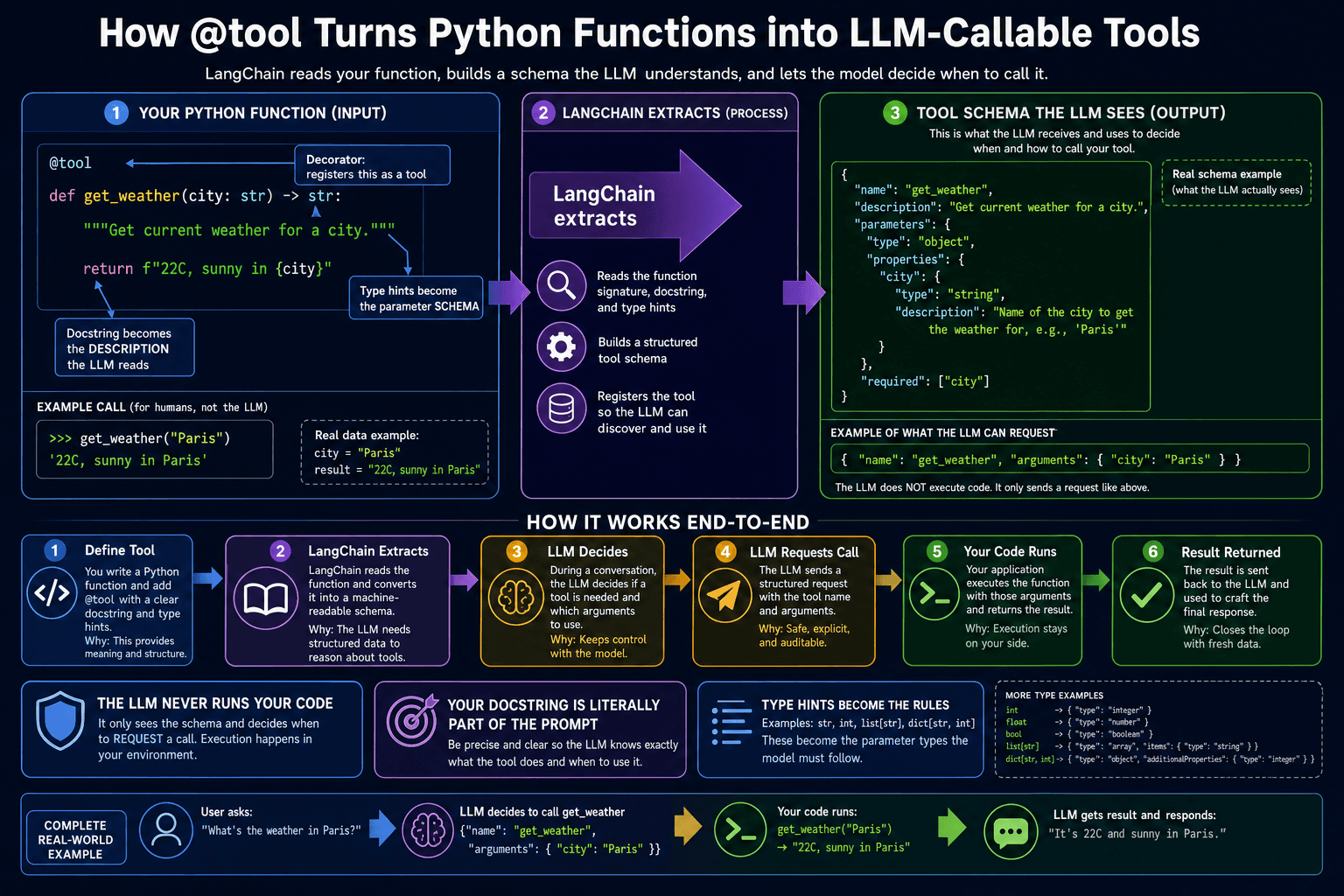
LLMs only know their training data. If you ask "What is the weather in Tokyo right now?", the model can only guess — it has no access to live data. Tools give the LLM real-time access to the outside world: weather APIs, databases, your own code, file systems, calculators, search engines. The LLM decides when to call a tool and what arguments to pass, but YOUR code actually executes it.
Click to zoom
Define a tool
tools_demo.py
from langchain_core.tools import tool

@tool                                                    # ①
def get_current_weather(city: str) -> str:               # ②
    """Get the current weather for a city.              # ③
    Returns temperature in Celsius and conditions.
    """
    # In a real app, call a weather API here
    weather_data = {
        'Tokyo': '18°C, partly cloudy',
        'Paris': '14°C, rainy',
        'London': '12°C, overcast',
    }
    return weather_data.get(city, f'No data for {city}')

@tool
def get_current_time(timezone: str) -> str:              # ④
    """Get the current time in a timezone (e.g. Asia/Tokyo)."""
    from datetime import datetime
    import pytz
    tz = pytz.timezone(timezone)
return datetime.now(tz).strftime('%H:%M %Z')①① @tool decorator from langchain_core.tools — converts any function into a Tool object
②② Python type hints become the parameter schema the LLM sees — city: str is required
③③ The docstring becomes the tool description the LLM uses to decide when to call it
④④ Multiple tools — the LLM can call any combination depending on the question
Bind tools to the model
tools_demo.py
model_with_tools = model.bind_tools([get_current_weather, get_current_time])

# When you invoke, the model may return tool_calls instead of text
response = model_with_tools.invoke('What is the weather in Tokyo?')

if response.tool_calls:
    print('Model wants to call:', response.tool_calls)
    # [{'name': 'get_current_weather', 'args': {'city': 'Tokyo'}, 'id': 'call_abc123'}]
else:
    print(response.content)
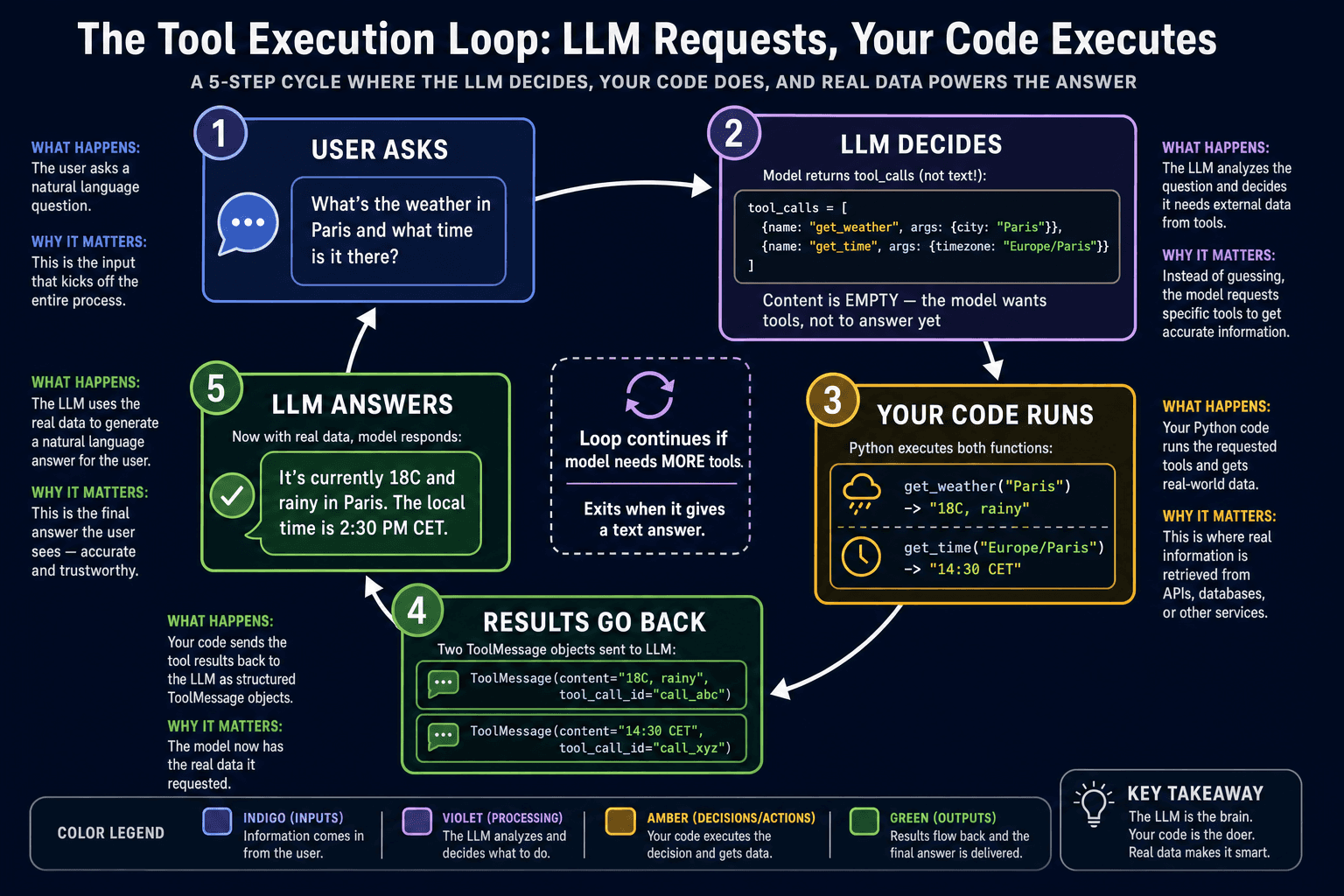
When you bind tools and invoke, the model may return a response with tool_calls — a list of tool invocations the model wants to make. The model does NOT call the functions itself. It tells you which function to call and with what arguments. Your code executes the function, then sends the result back so the model can formulate its final answer.
The tool execution loop
Click to zoom
tool_loop.py
from langchain_core.messages import ToolMessage

messages = [HumanMessage(content='What time is it in Tokyo?')]

while True:
    response = model_with_tools.invoke(messages)         # ①
    messages.append(response)                            # ②

    if not response.tool_calls:                          # ③
        print(response.content)                          # Final answer
        break

    for tool_call in response.tool_calls:                # ④
        tool_name = tool_call['name']
        tool_args = tool_call['args']

        if tool_name == 'get_current_time':
            result = get_current_time.invoke(tool_args)  # ⑤
        elif tool_name == 'get_current_weather':
            result = get_current_weather.invoke(tool_args)

        messages.append(ToolMessage(                     # ⑥
            content=str(result),
            tool_call_id=tool_call['id']
))①① Invoke the model with the current message history
②② Always append the model's response to history before the next turn
③③ If there are no tool_calls, the model has a final answer — we are done
④④ Loop through each tool call — the model may request multiple tools at once
⑤⑤ Execute the actual Python function with the arguments the model provided
⑥⑥ Wrap the result in a ToolMessage and append it — the model needs this to continue
This manual loop is exactly what create_agent() automates — lesson 07 shows you the easy way. Writing the loop once by hand is valuable because it makes the agent's behavior transparent. You will never be surprised by what an agent is doing once you understand this loop.
Knowledge Check
What is a ToolMessage and why does the model need it?
Recap — what you just learned
- ✓@tool turns any Python function into an LLM-callable tool — docstring becomes the description
- ✓model.bind_tools([...]) attaches tools to a model instance
- ✓The model does not execute tools — it requests them, YOUR code runs them
- ✓ToolMessage wraps execution results and sends them back to the model