Agent Memory & Context Management
- ▸Give agents persistent per-conversation memory with InMemorySaver
- ▸Understand thread isolation with thread_id
- ▸Manage context window limits with middleware
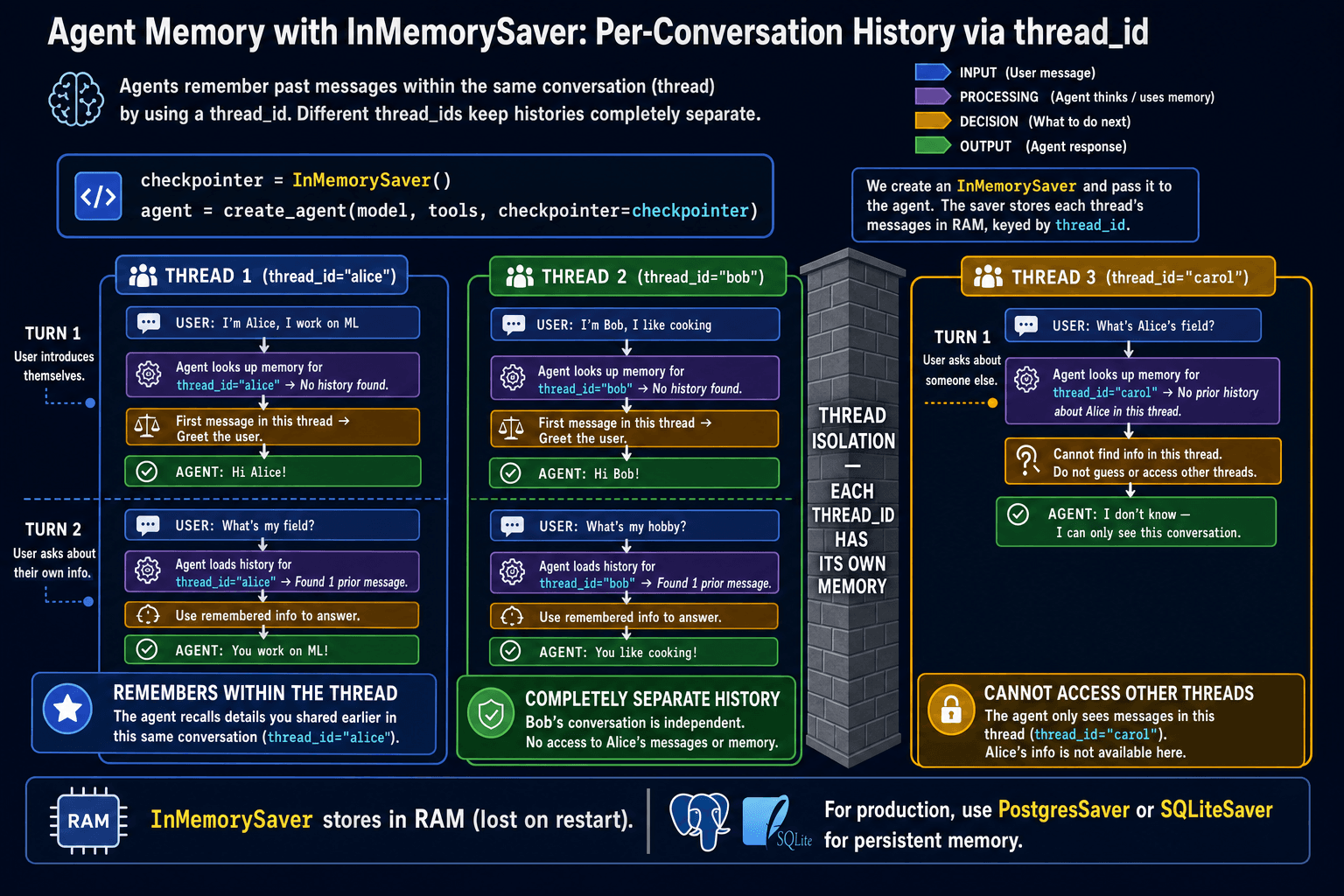
Agents are stateless by default — just like raw LLM calls. Each agent.invoke() starts a fresh conversation with no memory of previous calls. InMemorySaver is a checkpointer that stores conversation history in memory and restores it on the next call, keyed by a thread_id. This gives each conversation its own isolated, persistent memory.
Adding a checkpointer
from langgraph.checkpoint.memory import InMemorySaver
from langgraph.prebuilt import create_react_agent
from langchain.chat_models import init_chat_model

model = init_chat_model('openai:gpt-4o-mini')

agent = create_react_agent(
    model=model,
    tools=[],                              # add tools as needed
    checkpointer=InMemorySaver(),          # ① enables persistent memory
)

# Each thread_id is a separate conversation
config = {'configurable': {'thread_id': 'alice'}}  # ②

# Turn 1
agent.invoke({'messages': [HumanMessage(content='My name is Alice.')]}, config)

# Turn 2 — same thread_id, agent remembers
agent.invoke({'messages': [HumanMessage(content='I live in Paris.')]}, config)

# Turn 3 — agent knows both facts
result = agent.invoke({'messages': [HumanMessage(content='Where do I live?')]}, config)
print(result['messages'][-1].content) # "You live in Paris, Alice."With a checkpointer, each agent.invoke() with the same config is a continuation of the same conversation. The agent automatically retrieves the stored history for that thread_id, appends the new message, runs its loop, and saves the updated history. You do not manage any list manually — it is all automatic.
Thread isolation
# Alice's conversation
alice_config = {'configurable': {'thread_id': 'alice'}}
agent.invoke({'messages': [HumanMessage(content='My name is Alice.')]}, alice_config)

# Bob's completely separate conversation — does not see Alice's history
bob_config = {'configurable': {'thread_id': 'bob'}}
result = agent.invoke(
    {'messages': [HumanMessage(content='What is my name?')]},
    bob_config
)
print(result['messages'][-1].content)
# "I don't know your name. Could you tell me?" — bob has a fresh conversationManaging long contexts
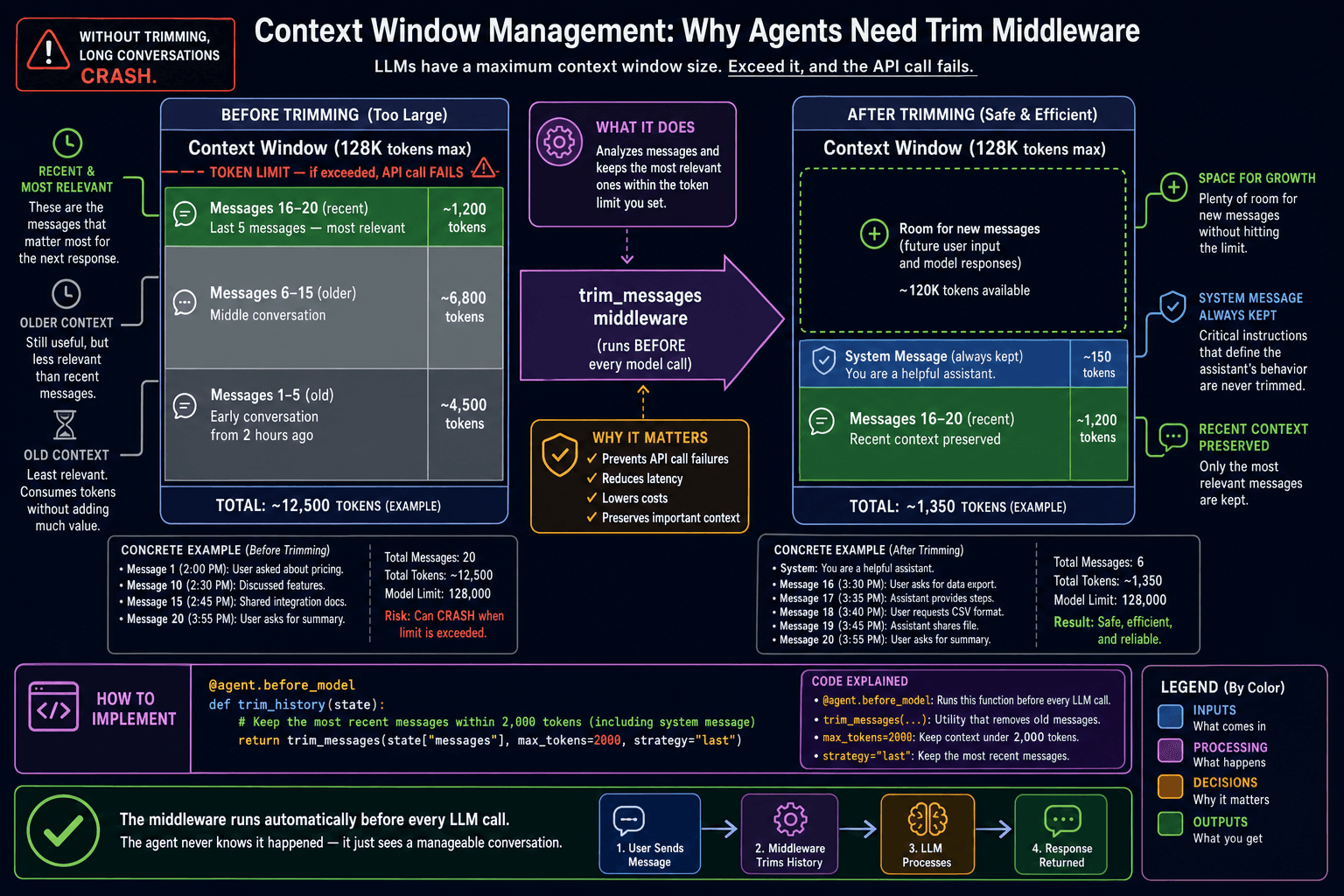
As conversations grow longer, the stored history eventually approaches the model's context limit. You can wrap the agent's model with a message-trimming step to automatically prune old messages before each call, keeping only the most recent turns that fit within your token budget.
from langchain_core.messages import trim_messages
from langchain_core.runnables import RunnableLambda

# Create a model that trims messages before each invoke
def trim_and_invoke(state):
    trimmed = trim_messages(
        state['messages'],
        max_tokens=4000,
        strategy='last',
        token_counter=model,
        include_system=True,
    )
    return model.invoke(trimmed)

# Use the trimmed model in the agent
agent = create_react_agent(
    model=RunnableLambda(trim_and_invoke),
    tools=my_tools,
    checkpointer=InMemorySaver(),
)- ✓checkpointer=InMemorySaver() gives agents automatic persistent memory in one line
- ✓thread_id identifies a conversation — same ID continues the same thread
- ✓Different thread_ids are completely isolated — use per-user IDs in production
- ✓trim_messages prevents context overflow in long conversations