Fasttrack· 07· 25 min
Your First Agent
What you'll learn
- ▸Understand what makes something an agent vs a single LLM call
- ▸Compare the manual tool loop to create_agent
- ▸Read and interpret agent message traces
This is the pivotal lesson. Everything before this was building blocks: LLM calls, message types, tools, memory. An agent puts them all together into a system that can reason, act, observe, and iterate. After this lesson, you can build applications that solve multi-step problems autonomously.
Click to zoom
What is an agent?
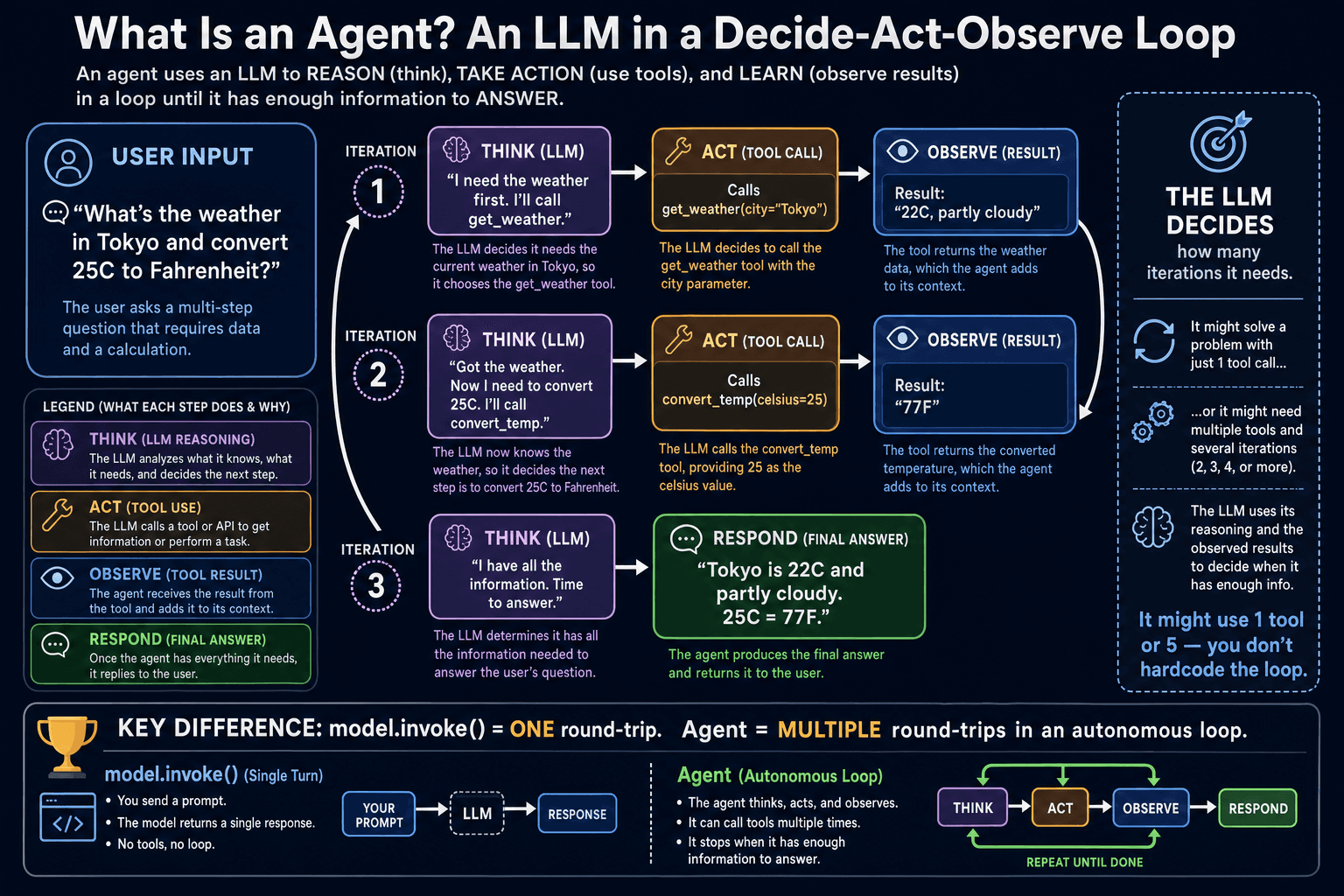
A single invoke() is one round-trip: you send a message, the model replies, done. An agent runs the LLM in a loop. On each iteration the model decides: "Do I have enough information to answer, or do I need to call a tool?" If it needs a tool, it calls it, observes the result, and loops again. It stops when it has enough information to give a final answer. This loop enables agents to solve problems that require multiple steps, multiple tool calls, or intermediate reasoning that cannot be done in a single pass.
Manual loop vs create_agent
Click to zoom
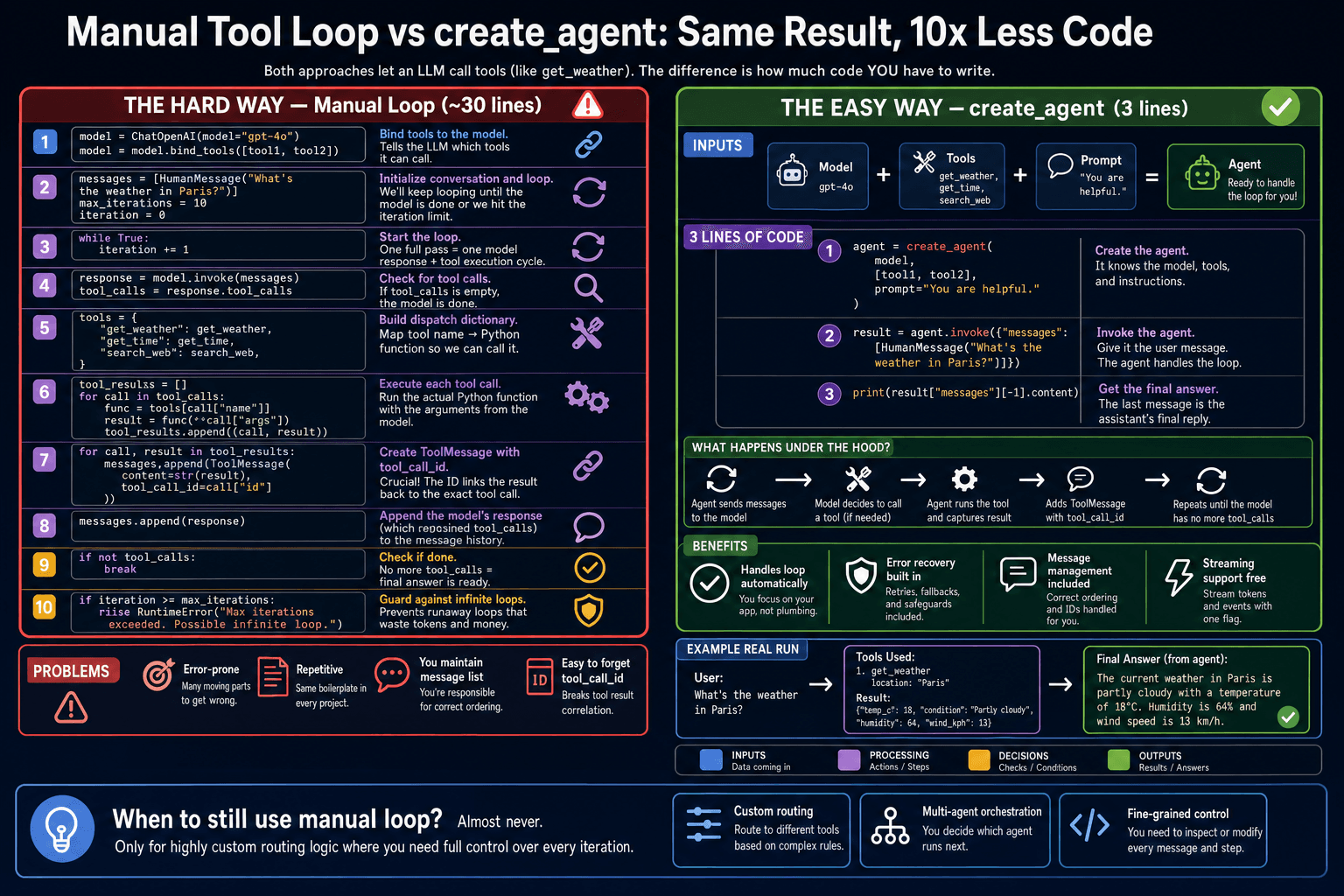
Manual tool loop
~30 lines · you control everything
- •Write the while loop yourself
- •Handle each tool call case by case
- •Manage ToolMessages manually
- •Easy to introduce bugs in the loop logic
- •Good for learning what is happening
create_agent
3 lines · handles everything
- •Loop, error handling, retries built-in
- •Automatically routes to correct tool
- •Manages all message types for you
- •Adds checkpointing and memory hooks
- •Good for production applications
Build your first agent
first_agent.py
from langchain.chat_models import init_chat_model
from langchain_core.tools import tool
from langgraph.prebuilt import create_react_agent

model = init_chat_model('openai:gpt-4o-mini')

@tool
def get_weather(city: str) -> str:
    """Get current weather for a city."""
    return f'The weather in {city} is 22°C and sunny.'

@tool
def get_population(city: str) -> str:
    """Get the population of a city.'''
    populations = {'Paris': '2.1 million', 'Tokyo': '14 million'}
    return populations.get(city, 'Unknown')

agent = create_react_agent(              # ①
    model=model,
    tools=[get_weather, get_population],  # ②
    prompt='You are a helpful travel assistant.'  # ③
)

result = agent.invoke({                  # ④
    'messages': [HumanMessage(content=
        'What is the weather and population of Paris?'
    )]
})①① create_react_agent builds the full ReAct (Reason + Act) loop for you
②② Pass a list of @tool-decorated functions — the agent will call them as needed
③③ Optional system prompt to shape the agent's persona and behavior
④④ Invoke with a messages dict — the agent runs the loop internally and returns when done
Reading the agent trace
The result contains all messages from the agent's loop. Reading the trace helps you understand exactly what the agent did: which tools it called, in what order, and why it stopped. This is invaluable for debugging and optimization.
read_trace.py
for message in result['messages']:
    role = message.__class__.__name__
    if hasattr(message, 'tool_calls') and message.tool_calls:
        for tc in message.tool_calls:
            print(f'[AIMessage] Calling {tc["name"]} with {tc["args"]}')
    elif hasattr(message, 'name'):
        print(f'[ToolMessage from {message.name}] {message.content[:80]}')
    else:
        print(f'[{role}] {str(message.content)[:80]}')

# Output:
# [HumanMessage] What is the weather and population of Paris?
# [AIMessage] Calling get_weather with {'city': 'Paris'}
# [ToolMessage from get_weather] The weather in Paris is 22°C and sunny.
# [AIMessage] Calling get_population with {'city': 'Paris'}
# [ToolMessage from get_population] 2.1 million
# [AIMessage] Paris has sunny 22°C weather and a population of 2.1 million.
The agent decides how many tool calls to make and when to stop — you do not write the loop. For the Paris question, it automatically called two tools in sequence, assembled the results, and wrote a final answer. This autonomous multi-step behavior is what makes agents powerful.
Knowledge Check
What is the fundamental difference between model.invoke() and an agent?
Recap — what you just learned
- ✓An agent is an LLM in a loop: think → act → observe → repeat until done
- ✓create_react_agent(model, tools) builds the full ReAct loop in 3 lines
- ✓The agent decides how many tool calls to make — you do not write the loop
- ✓Reading result["messages"] gives you the full trace of the agent's reasoning